Jetpack CRM
  • Home
    • Jetpack CRM Home
    • CRM Blog
    • Extensions
  • FAQs
  • Report a Bug
  • Request Feature
  • Features
    • Instant Answers
    • Customizable
    • Responsive
    • Analytics Dashboard
    • Article Feedback
    • Search Analytics
  • Blocks
  • FAQ
  1. Home
  2. Jetpack CRM
  3. Core Modules
  4. Task Scheduler
  5. Filter a CRM Member’s Tasks
Searching...

Filter a CRM Member’s Tasks

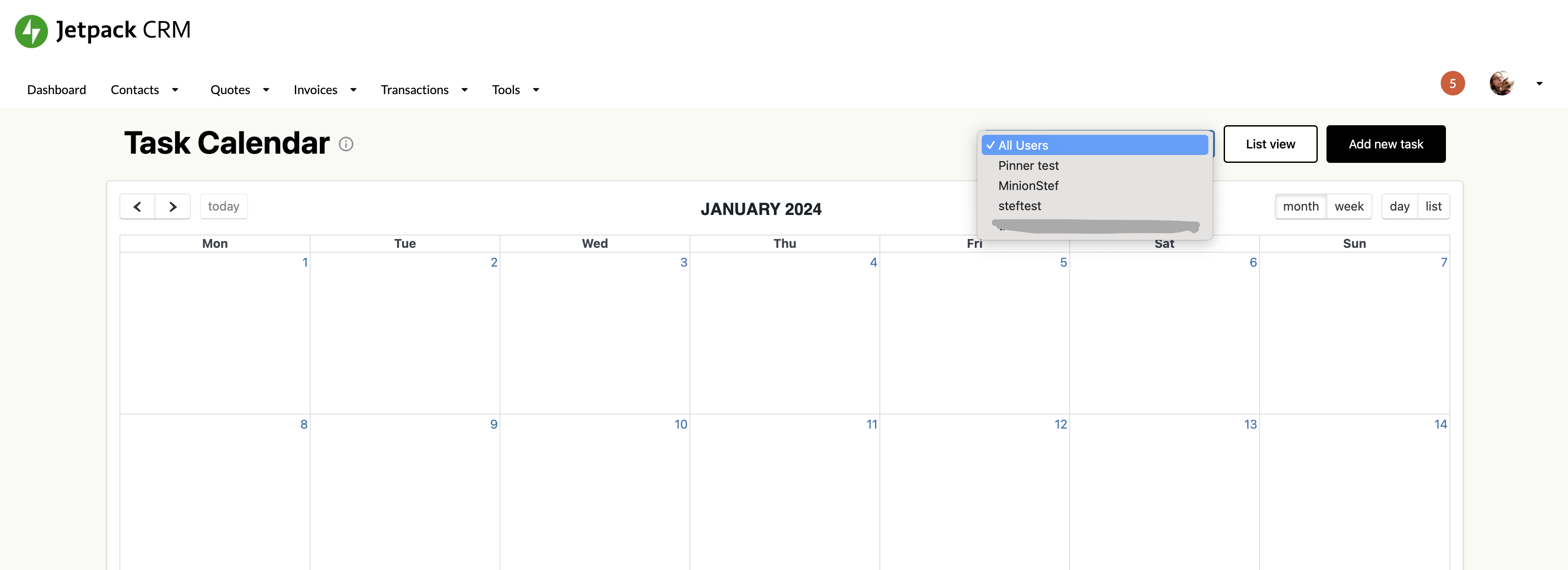
In the Task Scheduler you can assign CRM team members to particular tasks. 

If you then want to filter your CRM task calendar by a specific member, you can do that via the All Users dropdown menu, and select the member whose tasks you want to view.
Updated on January 25, 2024
Was this article helpful?
Yes No

Related Articles

  • Task Notifications not Sending
  • Adding Other CRM members to a Task
  • View the Tasks Agenda
  • The Jetpack CRM Task Scheduler
© Copyright Jetpack CRM.
  • Home
  • FAQs
  • Report a Bug
  • Request Feature
  • Features
  • Blocks
  • FAQ