
This article teaches you how to add a custom snippet of PHP code to your website which allows you to control which WordPress roles can have contacts distributed to them. The role(s) that you choose to distribute contacts to must have CRM permissions to access the relevant WP Admin screens.
This feature requires Jetpack CRM: Automations which is also available as part of the Entrepreneur Bundle.
We define our own CRM roles – but you may want to have additional roles defined in your WordPress setup and give these roles access to the CRM permissions.

You can do this using a plugin like the WPFront User Role editor. Using this plugin you can define additional roles and give certain access permissions to the roles you create.
Example: You may want to create an “Accountant” role who has access to your accounting plugin and your CRM but not access to your posts and pages. You can create a custom role with custom permissions to achieve this.
You can also grant the additional role a secondary role. This will grant that user role all the same user permissions as the secondary role. If you choose a CRM role, they can access the CRM screens and assign themselves to a contact.

Automations – distributing to additional roles
By default the Automations extension only distributes contacts to the CRM roles. If you want to have additional roles to distribute to, you need to add a snippet of code to make use of the available filter in the Automations extension.

Once you add the snippet of code to your functions.php or via a code snippet plugin like WPCode you’ll have the option to distribute the contact to the new role as shown in the screenshot below.
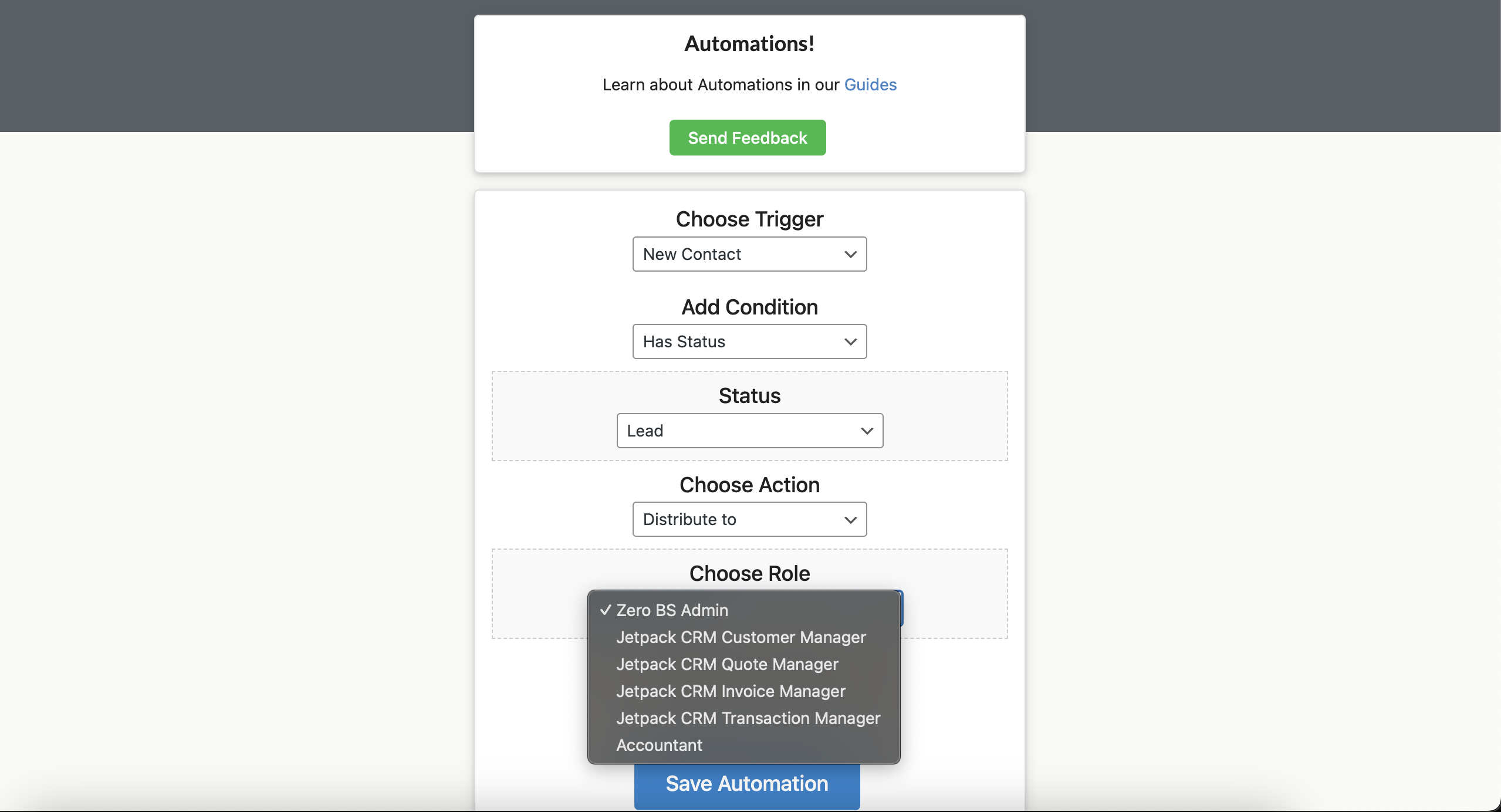
Steps for how to add additional roles to Automations
- First – you’ll need to have the latest version of Automations (1.5.8+).
- Define a new role and give that role CRM permissions using a plugin like WPFront User Role Editor.
- Install a plugin like WP Code, create your own plugin.
- Add the PHP snippet to WPCode, your plugin or your theme’s functions.php (via a child theme).
Here is how the snippet looks in a plugin like WPCode if you are not familiar with creating your own plugin or modifying your theme’s functions.php via a child theme.

PHP Snippet to add a new role to the “Distribute to” dropdown
The PHP Snippet below will filter the $roles which can be chosen in the drop down box.
function zeroBSCRM_automations_filter_ui_roles($roles){
    $roles['accountant'] = __('Accountant','zerobscrm');
    return $roles;
}
add_filter('zbs_filter_ui_roles','zeroBSCRM_automations_filter_ui_roles');
If you want multiple new roles to distribute contacts to (e.g. Accountant, Tax Man) then the PHP snippet would look like below.
function zeroBSCRM_automations_filter_ui_roles($roles){
    $roles['accountant'] = __('Accountant','zerobscrm');
    $roles['tax_man'] = __('Tax Man','zerobscrm');
    return $roles;
}
add_filter('zbs_filter_ui_roles','zeroBSCRM_automations_filter_ui_roles');