
This is a general overview of the Dashboard to start with.
The revenue chart shows the net total of your transactions over the past 12 months. It adds up every matching transaction, including negative-value transactions such as expenses or refunds.
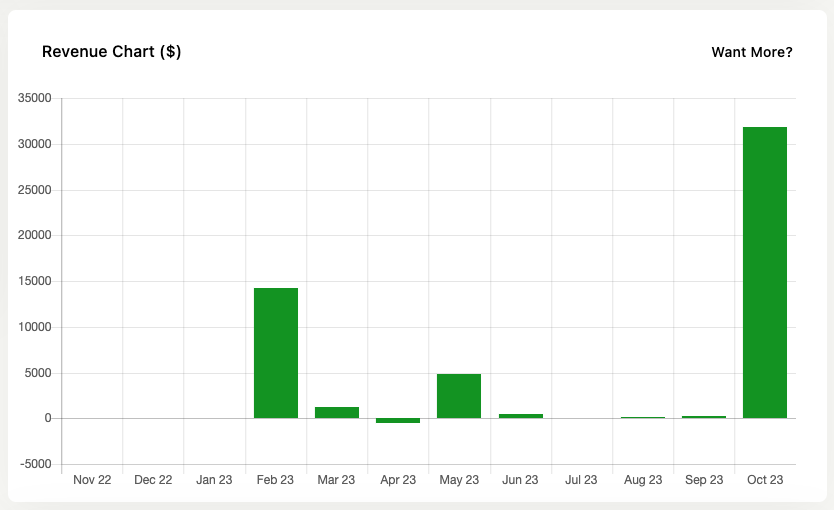
It’s a way of checking in on your sales progress over time. Is what you’re doing working, how are sales recently.
It follows your settings in Jetpack CRM → CRM Settings → Transactions and only counts transactions with a status you selected under “Include these statuses in total value”.
The colors of the bars have no meaning – they are just themed to fit the dashboard.
The Sales Dashboard extension adds more detailed revenue reports to your site.
When the chart appears
The revenue chart appears whenever you have at least one transaction in the past 12 months that matches your configured transaction statuses. The chart displays whether the net total is positive, zero, or negative.
If you track both income and expenses in Jetpack CRM, enter expenses as negative-value transactions. The chart shows the net result of income minus expenses, and it still displays when expenses cancel out or exceed income.
The message “No valid transactions were added during the last 12 months” appears only when you have no transactions at all in the last 12 months matching the statuses selected in Jetpack CRM → CRM Settings → Transactions under “Include these statuses in total value”. It does not appear because your net total is zero or negative.
Jetpack CRM v6.8.4 fixed an issue where the chart was hidden and this message displayed even though matching transactions existed, whenever the 12-month total came to zero or less. Update to Jetpack CRM 6.8.4 or later if you see this message while transactions exist.
Latest Contacts & Activity
The latest customers show you the ten most recent contacts and their statuses. This is good to check in on the latest opportunities for your business.
There’s also a section showing the latest CRM-wide activity, which you can check in to see if things are happening as expected.